Database Errors
This troubleshooting guide covers common database errors you may encounter when working with Medusa and how to resolve them.
General Errors Connecting to Database#
When you start your Medusa application you may run into the following error:
This error occurs because the application couldn't connect to the PostgreSQL database. The issue could be one of the following:
- PostgreSQL server isn't running. Make sure it's always running while the Medusa application is running.
- The connection URL to your PostgreSQL database is incorrect. This could be because of incorrect credentials, port number, or connection URL format. The format should be
postgres://[user][:password]@[host][:port]/[dbname]. Make sure that the connection URL format is correct, and the credentials passed in the URL are correct. You can learn more about formatting the connection URL here
SASL Errors#
When installing or running Medusa, you may get errors while Medusa tries to connect to your PostgreSQL database.
For example, you may get one of the following errors:
Error During Installation
If the connectivity error occurs while running create-medusa-app, it means you passed incorrect database credentials when prompted during the installation. Make sure that:
- PostgreSQL is installed and running on your machine;
- Your PostgreSQL server is configured at
localhost:5432(the default host and port); If not, you can pass the--db-url <url>flag to thecreate-medusa-appcommand to specify a custom database URL; - You're passing correct username and password for your PostgreSQL database;
- You're using a user that has privileges to create new databases;
- You're passing correct database name for your PostgreSQL user. It should have the same name as your PostgreSQL user by default.
Error During Development
If the error occurs while running integration tests, make sure that:
- The
DATABASE_URLenvironment variable is set correctly in your.envfile; - The projectConfig.databaseUrl field in your
medusa-config.jsfile is set to theDATABASE_URLenvironment variable; - The database URL is using correct username and password, and points to a running PostgreSQL database instance.
Error While Running Migrations#
When you run the db:migrate or other commands that connect to the database, the command may hang or you may get the following error:
This error means Medusa couldn't connect to your database while running migrations. It's usually caused by an incorrect database URL or an SSL configuration issue.
Incorrect Database URL
If the database URL is wrong, Medusa can't connect to the database. For example, the host name, port, or credentials are incorrect.
Check that your DATABASE_URL environment variable is set correctly. The format is postgres://[user][:password]@[host][:port]/[dbname]. Make sure that the host, port, credentials, and database name are all correct.
If you're using Docker, make sure the host matches your setup:
- Inside a container, use the container's service name as the host.
- Outside a container, use
localhostor the host's IP address.
Refer to the databaseUrl configuration documentation to learn more about formatting the database URL.
SSL Connection Issues
When your database URL uses a host other than localhost or 127.0.0.1 without specifying an SSL mode, Medusa tries to connect to the database over SSL. This also may happen when running Medusa in a Docker container.
If your PostgreSQL server doesn't support SSL, the connection fails. So, disable it explicitly by setting the ssl property to false in the databaseDriverOptions.connection configuration:
Alternatively, add the sslmode=disable query parameter to your database URL:
If your database requires SSL, such as a managed database that uses a self-signed certificate, enable SSL by setting the ssl property to an object instead:
Refer to the databaseDriverOptions configuration documentation to learn more about configuring the database connection.
Insufficient Database Privileges#
The database user you use in the databaseUrl Medusa backend configuration must have create privileges. Otherwise, you'll face problems when running migrations.
If you're using the postgres superuser, then it should have these privileges by default. Otherwise, make sure to grant your user create privileges. You can learn how to do that in PostgreSQL's documentation.
Can't Connect to PostgreSQL Docker Container#
When connecting your Medusa application to a PostgreSQL Docker container, make sure the 5432 port is exposed.
To do that, either pass the -p option to the docker run command. For example:
Or, if you're using Docker Desktop, you can provide the option under the container's "Optional settings" collapsable.
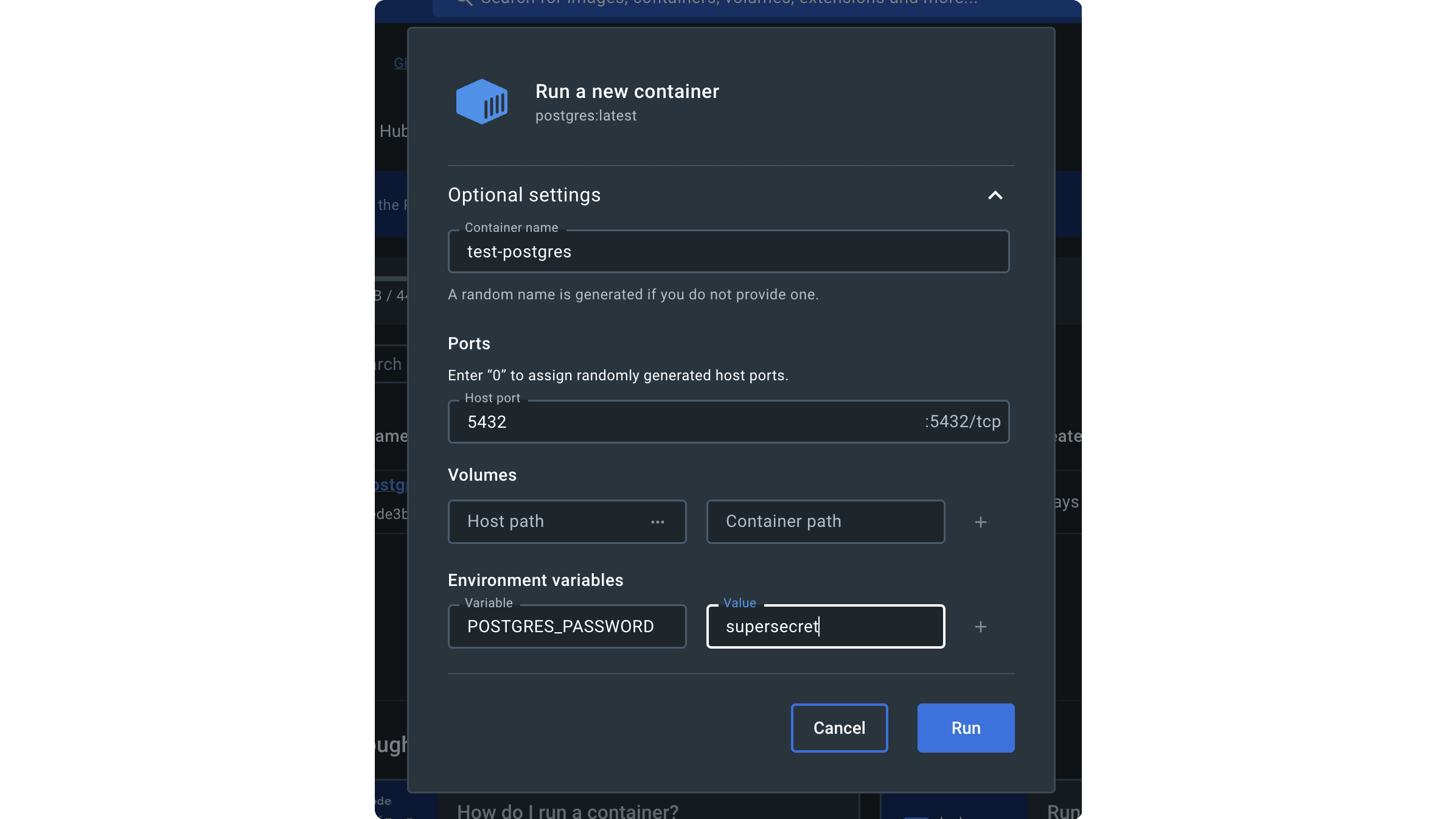
If you expose the PostgreSQL docker container at a port other than 5432, make sure to include it in your database URL.
When installing Medusa with create-medusa-app, you can provide a database URL with the different port using the --db-url option.
For example:
Where <YOUR_PORT> is the exposed port if it's different than 5432.
Refer to the databaseUrl configuration documentation to learn how to set the database URL for an installed Medusa application.