Translate Custom Data Models
In this chapter, you'll learn how to support translations for your custom data models using the Translation Module.
Summary#
The Translation Module allows you to extend translation capabilities to custom data models in your Medusa application. Then, you can manage translations from the Medusa Admin, and serve translated resources in your configured locales.
By following this guide, you'll learn how to:
- Configure the Translation Module to support translations for your custom data models.
- Manage translations for your custom data models from the Medusa Admin.
- Serve translated resources in your configured locales.
Prerequisites: Custom Data Model#
This guide assumes you already have a custom module with a data model. The guide will use a Blog Module with the following Post data model as an example:
import { model } from "@medusajs/framework/utils"

const Post = model.define("post", {
  id: model.id().primaryKey(),
  title: model.text(),
})

export default Post
The module must also be registered in . For example:
module.exports = defineConfig({
  // ...
  modules: [
    // other modules...
    {
      resolve: "./src/modules/blog",
    },
  ],
})
Step 1: Configure Translatable Data Models#
translatable method is available since Medusa v2.13.0. Previous versions required configuring translatable data models in medusa-config.ts, which is now deprecated.The first step is to configure the properties of your custom data models that you want to support translations for. This will allow admin users to translate the data model's records from the Medusa Admin, and manage whether the model and its properties are translatable.
For example, update your Post data model to mark its title property as translatable:
import { model } from "@medusajs/framework/utils"

const Post = model.define("post", {
  id: model.id().primaryKey(),
  title: model.text().translatable(),
})

export default Post
When you add the .translatable() method to a property, the data model automatically appears in Settings → Translations in the Medusa Admin.
Next, go to Step 2: Manage Translations from Medusa Admin.
Deprecated: Manage From medusa-config.ts#
Before Medusa v2.13.0
Step 2: Manage Translations from Medusa Admin#
After configuring the Translation Module, you can manage translations for your custom data models from the Medusa Admin.
Run the following command to start the Medusa application:
Then, open the Medusa Admin and go to Settings -> Translations. You should see your custom data model in the list of translatable resources.
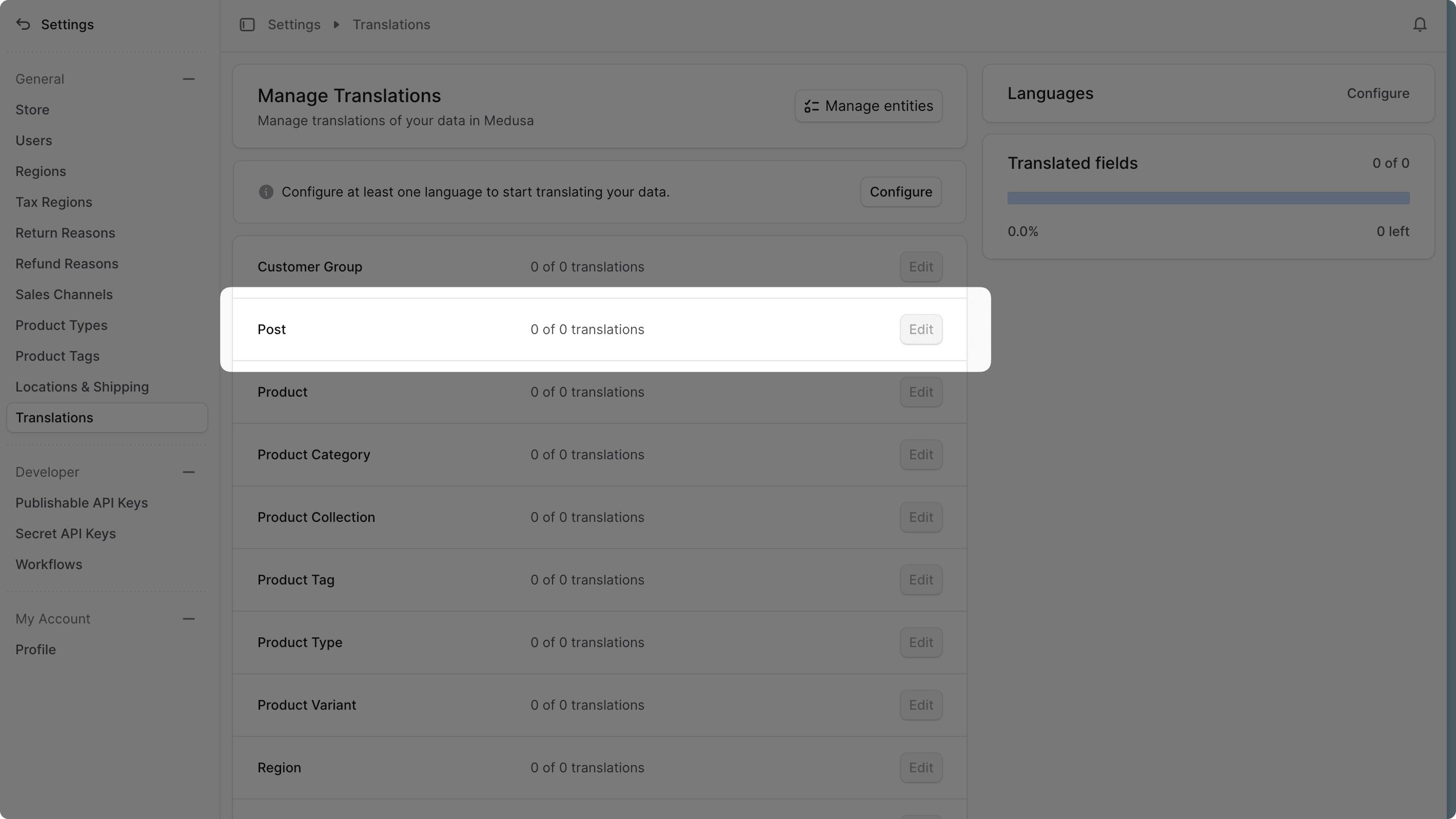
Click the Edit button for your custom data model to manage translations for its resources. You can manage translations for the configured locales and fields.
Learn more in the Translations User Guide.
Step 3: Serve Translated Resources#
Finally, you can serve translated resources for your custom data models in your configured locales. This section focuses on returning records with translated fields from API routes.
Pass Locale in API Requests#
Medusa supports passing the desired locale in API requests to /store routes using either:
- The
localequery parameter. - The
x-medusa-localeheader.
For example, assuming you have a /store/posts API route, you can pass the locale in the request as follows:
If your API route isn't under the /store prefix, you must apply the applyLocale middleware. For example, add the middleware to the src/api/middlewares.ts file:
import { applyLocale, defineMiddlewares } from "@medusajs/framework/http"

export default defineMiddlewares({
  routes: [
    {
      matcher: "/posts",
      middlewares: [applyLocale],
    },
  ],
})
This allows you to pass the locale in the query parameter or request header for the /posts API route.
Handle Translations in API Routes#
In your custom API routes, you can retrieve the request's locale from the locale property of the MedusaRequest object. Pass that property to Query to retrieve your data models with translated fields.
For example, to retrieve blog posts with translated titles in the /store/posts API route:
import { MedusaRequest, MedusaResponse } from "@medusajs/framework/http"
import {
  ContainerRegistrationKeys,
} from "@medusajs/framework/utils"

export async function GET(
  req: MedusaRequest,
  res: MedusaResponse
) {
  const query = req.scope.resolve(
    ContainerRegistrationKeys.QUERY
  )

  const { data: posts } = await query.graph(
    {
      entity: "post",
      fields: ["id", "title"],
    },
    {
      locale: req.locale,
    }
  )

  res.json({ posts })
}
In this example, the locale option is set to req.locale. Medusa will set the title field of each post to its translated value if a translation is available for the requested locale. Otherwise, it returns the original value stored in the data model.
Step 4: Test the Implementation#
To test the implementation, start the Medusa application if you haven't already:
Then, send a request to your custom API route with the desired locale. For example:
curl "http://localhost:9000/store/posts?locale=fr-FR" \
-H 'x-publishable-api-key: {your_publishable_api_key}'
This should return the list of blog posts with their French translations for the title field if available:
{
  "posts": [
    {
      "id": "post_123",
      "title": "Titre de l'Article"
    },
    {
      "id": "post_456",
      "title": "Un Autre Titre"
    }
  ]
}
Pass Locale to useQueryGraphStep
If your API route executes a workflow and returns its result, you can retrieve data models with translated fields in the workflow by passing the locale to useQueryGraphStep.
For example:
import { createWorkflow, WorkflowResponse } from "@medusajs/framework/workflows-sdk"
import { useQueryGraphStep } from "@medusajs/medusa/core-flows"

type WorkflowInput = {
  locale: string;
}

export const handlePostsWorkflow = createWorkflow(
  "handle-posts",
  (input: WorkflowInput) => {
    // do something...

    const { data: posts } = useQueryGraphStep({
      entity: "post",
      fields: ["id", "title"],
      options: {
        locale: input.locale,
      },
    })

    return new WorkflowResponse({
      posts,
    })
  }
)
In this example, the workflow accepts a locale input parameter. You then retrieve the posts with translated titles by passing the locale input to useQueryGraphStep.
The returned posts will have their title field set to the translated value if a translation is available for the requested locale.
You can execute the workflow in your custom API routes and pass the request locale as an input parameter:
import { MedusaRequest, MedusaResponse } from "@medusajs/framework/http"
import { handlePostsWorkflow } from "../../workflows/handle-posts"

export async function GET(
  req: MedusaRequest,
  res: MedusaResponse
) {
  const { result } = await handlePostsWorkflow(req.scope)
    .run({
      input: {
        locale: req.locale,
      },
    })

  res.json(result)
}
The returned posts in the API response will have their title field set to the translated value if a translation is available for the requested locale.
Manage Translations with the Translation Module Service#
For more complex cases, you can manage translations for your custom data models programmatically using the Translation Module's service. You can create, update, delete, and retrieve translations of any resource using the service's methods.
Refer to the Translation Module service reference for a full list of available methods and how to use them.